In Mosaic and Stories it's possible to show themes and sections based on conditions. This makes it possible to show or hide themes/sections based on the users selection. Conditions are created through a dedicated tab in the Theme Settings (Mosaic), Chapter Settings (Stories) and Tile settings.
Important! Conditions are not the same as authorization. When a user has a link to a theme, he can always visit the theme. Conditions only add/remove the themes from the normal navigation. For authorization checks Usergroups and Accessgroups in Studio.
Fields
It's possible to add conditions for the following fields:
| Field | Description | Code | Expected value |
| BaseGeoLevel | The current selected base geolevel | GeoLevel code | |
| BaseGeoItem | The current selected base geoitem | GeoItem code | |
| BasePeriodLevel* | The current selected base period | PeriodLevel code | |
| BasePeriodItem* | The current selected base period | Period code | |
| BaseDimensionLevel* | The current selected base dimensionlevel | DimensionLevel code | |
| BaseDimensionMember* | The current selected base dimension member | DimensionMember code | |
| ReferenceGeoLevel | The current selected reference geolevel | GeoLevel code | |
| ReferenceGeoItem | The current selected reference geoitem | GeoItem code | |
| ReferencePeriodLevel* | The current selected reference period | PeriodLevel code | |
| ReferencePeriodItem* | The current selected reference period | Period code | |
| ReferenceDimensionLevel* | The current selected reference dimensionlevel | DimensionLevel code | |
| ReferenceDimensionMember* | The current selected reference dimension member | DimensionMember code | |
| BaseData | Use the current user base selection to retrieve the value of an indicator | Indicator code | The value of the indicator for the current user base selection. |
| ReferenceData | Use the current user reference selection to retrieve the value of an indicator | Indicator code | The value of the indicator for the current user reference selection. |
(*) For these option, an additional license maybe required. Please contact your account manager for the options.
For BaseData and ReferenceData it is possible to check for special values like -99998 (NVT) or -99996 (EMPTY)
Operator
To construct the if statements the following operators are available
| Operator | Description |
| Equal | The supplied value must match the field value exactly |
| NotEqual | The supplied value must be different from the field value |
| Greater* | The current value must be greater than the supplied value |
| GreaterEqual* | The current value must be greater than or equal to the supplied value |
| Less* | The current value must be less than the supplied value |
| LessEqual* | The current value must be less than or equal to the supplied value |
| In | Multiple codes can be supplied, seperated by ';'. |
| NotIn | Multiple codes can be supplied, seperated by ';'. |
(*) This options work only with Periods, BaseData and Referencedata; eg. BasePeriodItem > 2016
Grouping
With the small '+' button you can group certain clauses. This makes it possible to make more complex statements which would require parenthesis, for example:
(BaseGeoLevel EQUALS gemeente AND BaseGeoItem EQUALS 1680) OR (BaseGeoLevel EQUALS provincie AND BaseGeoItem EQUALS 4)
Below is an example of what it looks like in Mosaic.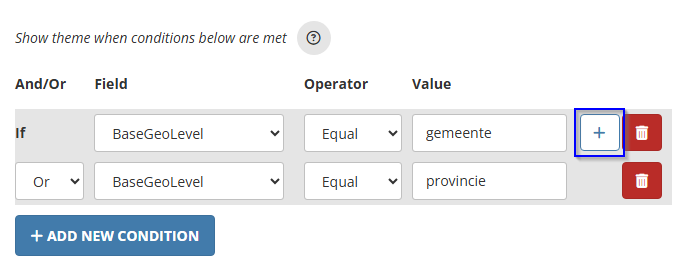
Was dit artikel nuttig?
Dat is fantastisch!
Hartelijk dank voor uw beoordeling
Sorry dat we u niet konden helpen
Hartelijk dank voor uw beoordeling
Feedback verzonden
We stellen uw moeite op prijs en zullen proberen het artikel te verbeteren